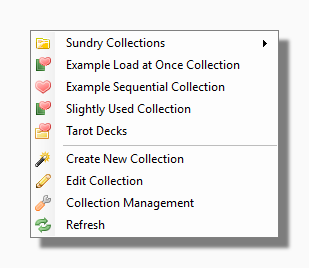
The top section of the My Collections menu is different for every user because it shows the Collections which are installed in your own unique Collections Folder. Your Collections Folder can also contain sub-folders which can contain Collections or more subfolders and so on.
Collections are predefined lists of decks that might be stored in different sub-folders of your main Decks Folder. This gives you the possibility of classifying your decks in different ways simultaneously. For example you might have a folder full of Rider Waite Decks and another containing Le Normand Decks. A collection of Italian Decks would allow you another way of listing decks that might be in either folder.
Once the collection has been defined the program gives you various ways of comparing its decks side by side. How this works exactly will depend on what type of collection it is. Basically there are three kinds of collections to consider.
Edit Collection: Selecting this item lets you browse for an existing Collection and then launches the Collections Wizard in Edit mode.
Collection Management launches the Collection Management Tool.
Refresh This rebuilds the My Collections menu. You may wish to use this if you have manually added to or reorganized your Collections Folder outside the program e.g. using Windows Explorer.